Business
Payouts
*What this page covers: what triggers a payout, what gets paid and what doesn't, and how to read your check-in list like a statement.*
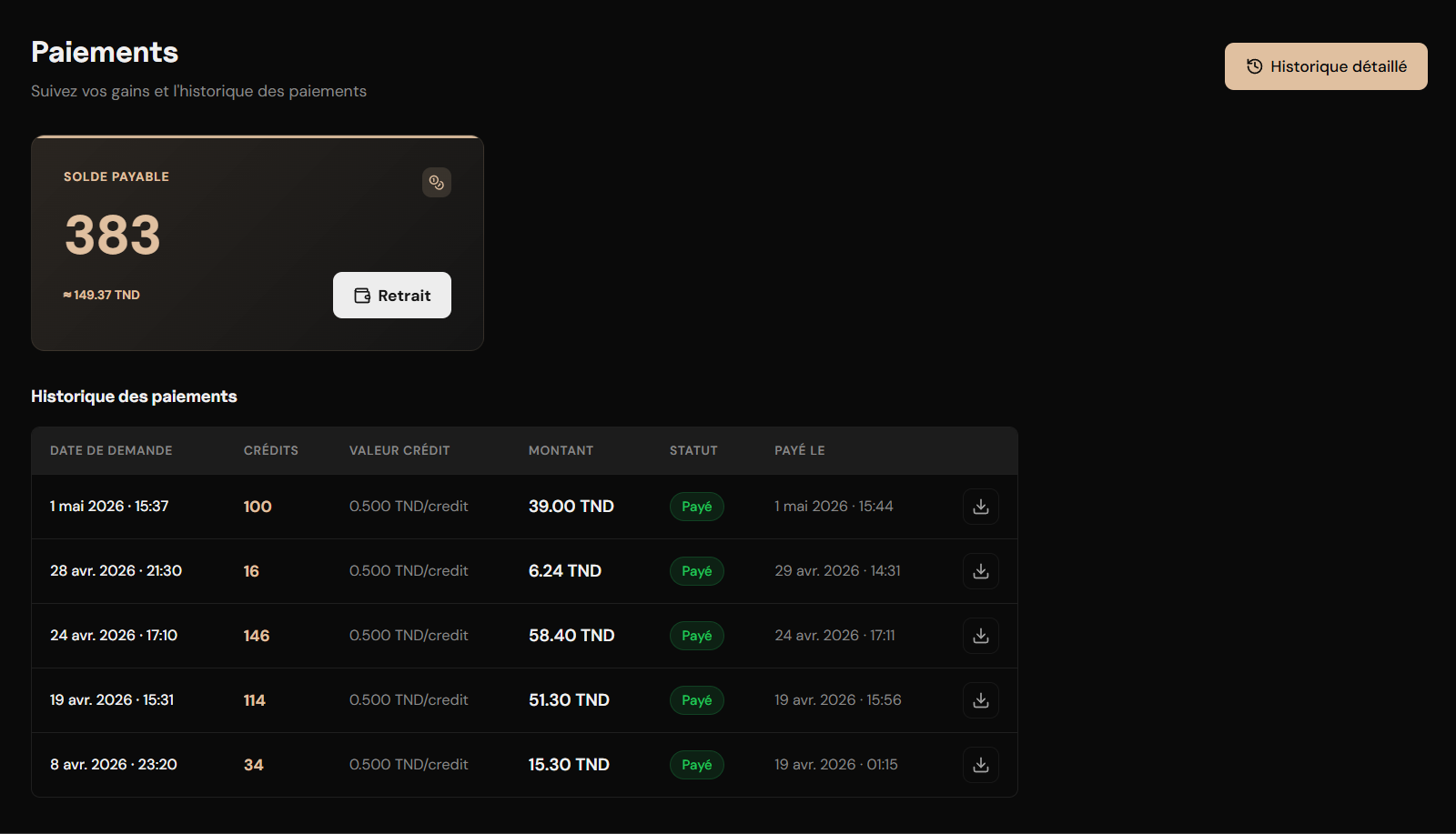
Yes, you get paid. You only get paid when someone actually attends your gym. Payouts are made directly in Tunisian Dinars (TND) to your bank account within 3 business days of a dashboard request, minus the agreed platform fee.
Your check-in list is the source of truth.
Every single check-in — payable or not — is logged and visible in your operator dashboard in real time. You can filter by session, date, or check-in type. What you see in that list is exactly what we use to calculate your payouts. No hidden deductions, no guesswork.
Payout structure
Here is the summary of the payout terms and currency parameters for your gym:
| Item | Detail |
|---|---|
| Payout trigger | Confirmed QR check-in by a paying platform member — not booking, not reservation |
| Payout request | On demand — request from your operator dashboard at any time |
| Processing time | Approved and transferred within 3 business days of request |
| Currency | TND — transferred directly to your registered bank account |
| Token conversion rate | 1 token = 0.500 TND (before platform fee deduction) |
| Platform fee | Agreed as a percentage during onboarding — deducted before transfer |
| No-show credit | None — no-shows do not generate gym revenue |
| Local member check-in | Not payable — marked as local in your check-in list |
| Trial token check-in | Not payable — marked in pink in your check-in list |
| Minimum payout threshold | None — all accrued credits are transferred regardless of amount |
Check-in types & what you see
Every check-in is logged with a specific type to show you exactly how each visit influences your pending credits:
Pre-booked check-in
PayableA platform member with a prior booking who checked in within the first 60 minutes of the session. Charged at the discounted token price. Generates a full credit for your gym at the discounted rate.
Walk-in check-in
PayableA member who arrived without a prior booking and checked in directly. Always charged at the standard token price regardless of session discount configuration. Generates a full credit for your gym at the standard rate.
Local member check-in
Not payable · marked as localLocal members are offline gym subscribers — people who are already your members outside of Fitnessers and have been granted access to app features without a platform subscription. Their check-ins are recorded and visible in your list but do not generate a token credit. They are labelled clearly as local in the check-in log.
Trial token check-in
Not payable · marked in pinkMembers who were granted a trial token by Fitnessers check in like any other member — but the trial token is not a paid transaction. These check-ins are highlighted in pink and are excluded from your payout calculation.
Exports & payout documents
Here is how you can export your records at any time for bookkeeping:
CSV export
Download a full CSV of your check-in list at any time — every check-in, type, member, session, and amount charged. No date restriction. Export whenever you need it for your own records or accounting.
Payout statement PDF
Every approved payout generates a PDF statement automatically. It includes the billing period, total tokens earned, platform fee percentage and amount deducted, and net amount transferred to your account. The statement is issued under your gym name, address, and RNE code — ready for your accounting records. Saved in your dashboard and available to download at any time after the payout is processed.
Payout summary
When you request a payout, a summary is generated covering the period since your last payout request:
- Billing period covered by the payout
- Total tokens earned from payable check-ins
- Platform fee percentage and amount deducted
- Net amount transferred to your account
- Payment date
No upfront cost
There is no fee to list your gym, no monthly platform subscription, and no charge for the Staff app or setup meeting. Our revenue model is entirely performance-based — we earn only when your paying members attend.Disputing a payout
If you believe a specific session's credits are incorrect — missing check-ins, wrong type classification, disputed cancellations — contact us through your operator channel. We reconcile the session log against the check-in records and adjust if warranted.
Disputes must be raised within 14 days of the payout summary being generated. Include the session date, the member name if known, and what you believe is incorrect. We respond within 3 business days.
You've read the manual and you know how the system operates day-to-day. If this makes sense for your business, the next step is a single direct conversation with the founder.